What a scan does
From a Git URL to a graph in Neo4j. The seven steps of a Graphnous scan, and how the server runs them in Docker containers.
The Graphnous team
6 min read
You give Graphnous a Git repository and press scan. A few minutes later, its modules, classes, methods and the calls between them are in a graph you can query. This post follows a scan through the server, step by step.
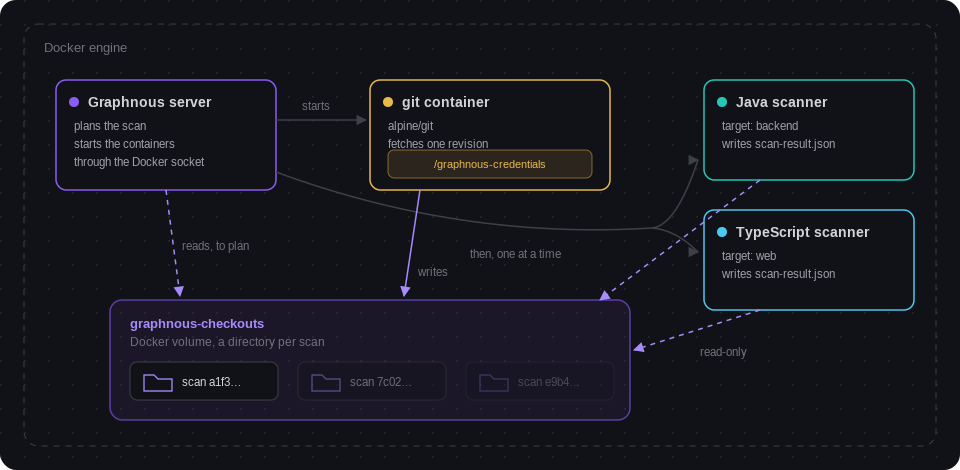
The server never reads the repository from the host's filesystem. The work happens in short-lived Docker containers, which the server starts through the Docker socket.
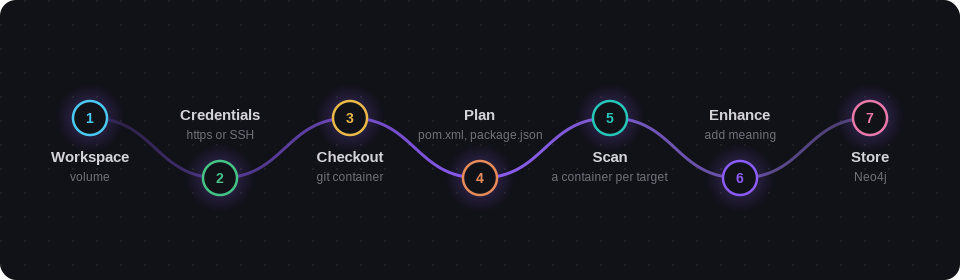
1. A workspace in a Docker volume
Repositories are checked out in a Docker volume, graphnous-checkouts. Each
scan gets its own directory in it, named after the scan.
The server has the volume mounted too, so it can read the checkout to plan the scan. The containers it starts later mount the same volume by name. That's why the server itself runs in a container: it doesn't need any path on the host.
2. Public or private
Next, the server works out how to fetch the repository:
- Public repositories over https need nothing else.
- Private repositories on GitHub are fetched over https with the access of the Graphnous GitHub App, when it's installed for them.
- Other private repositories are fetched over SSH with the private key you configured, and the host keys of your Git servers. Graphnous only connects to servers listed in those known hosts.
The key never goes in the workspace. The server copies it into the git
container only, at /graphnous-credentials, outside the volume. Scanner
containers can't see it, and it's gone when the git container is removed.
3. The checkout
The server starts a container from the alpine/git image, with the
workspace volume mounted. It runs git init, adds the repository as a
remote, and fetches only what the scan asks for: a branch, a tag or a
commit, at depth 1 when the server allows it. Then it checks out that
revision and records which commit it was.
Git's output goes to the scan's log as it runs, so you can follow the checkout in the web app. When it's done, the git container is removed.
4. A plan
With the code checked out, the server looks for build files:
pom.xmlfor Java projects, built with Mavenpackage.jsonfor TypeScript and JavaScript projects
Each project becomes a target. A pom.xml inside the directory of
another one is a module of that project, so it's scanned with it rather than
as a target of its own. The same goes for packages in an npm workspace.
For each target, the server also detects the language version, such as the Java release or the Node version, so the scanner can use it. If you started the scan for some languages only, targets in other languages are left out.
The result is a plan: the list of targets to scan, and any warnings, which go to the scan's log.
5. A scanner per target
The server scans the plan's targets one at a time. For each, it starts a
container from the
scanner's image for its language, such as
ghcr.io/graphnous/graphnous-java-scanner.
- The checkout is mounted read-only: a scanner can't change your code.
- The scanner gets the path of the target, the language version and where to write its output.
- Each scanner can keep a cache between scans in a volume of its own, such as the Maven libraries or npm packages it downloaded to resolve calls into them.
The scanner reads the code and writes one JSON file: the target's modules, files, packages, classes, methods, fields, annotations and dependencies, and what each method uses. When the container stops, the server copies the JSON out of it and removes the container.
Once every target has been scanned, the server collects the results. A target that fails doesn't fail the scan: the others are still stored, and the failure is in the log. Only when no target could be scanned does the scan fail.
6. Enhancers
A scanner records what the code is: a class with an annotation, a method
that calls another. Enhancers add what it means. Graphnous comes with
enhancers for Spring, React, Angular, Next.js and the browser's fetch, and
enhancers can also be written as JSON manifests.
Enhancers never change the scanned nodes. They add nodes of their own,
linked to the code they came from with an ENHANCE relationship. Each one
has the ENHANCED label and the enhancer's namespace, such as
Spring_Controller, so it can't collide with the scanned data or another
enhancer, and you can always tell which enhancer added what.
An example: the Spring enhancer
Take a Spring Boot controller with one GET endpoint, and a service it has
autowired:
@RestController
@RequestMapping("/orders")
public class OrderController {

    @Autowired
    private OrderService orderService;

    @GetMapping("/{id}")
    public Order findById(@PathVariable Long id) {
        return orderService.findById(id);
    }
}@Service
public class OrderService {
public Order findById(Long id) {
// ...
}
}The Java scanner records two classes, their methods, their annotations, and
that OrderController.findById calls OrderService.findById. To the
scanner, @RestController is just an annotation.
The Spring enhancer reads those annotations the way Spring does:
@RestController(or@Controller) makes the class aController, with the@RequestMappingpath as its base URL:/orders.@GetMapping("/{id}")makes the method anEndpoint:GETon/orders/{id}, the base URL and the method's path joined.@PostMapping,@PutMapping,@PatchMapping,@DeleteMappingand@RequestMappingwork the same way.@PathVariable Long idbecomes aPathVariableof the endpoint.@RequestParamparameters becomeQueryParameternodes and@RequestBodyaRequestBody, each with its type and whether it's optional.@ServicemakesOrderServiceaService.@Repository,@Component,@Configurationand@SpringBootApplicationget a node of their own too, and so does every@Beanmethod.@Autowiredconnects them: the controllerINJECTSthe service. Constructor injection counts too, and a class with a single constructor has it autowired without the annotation, as in Spring itself.
In the graph, that's:
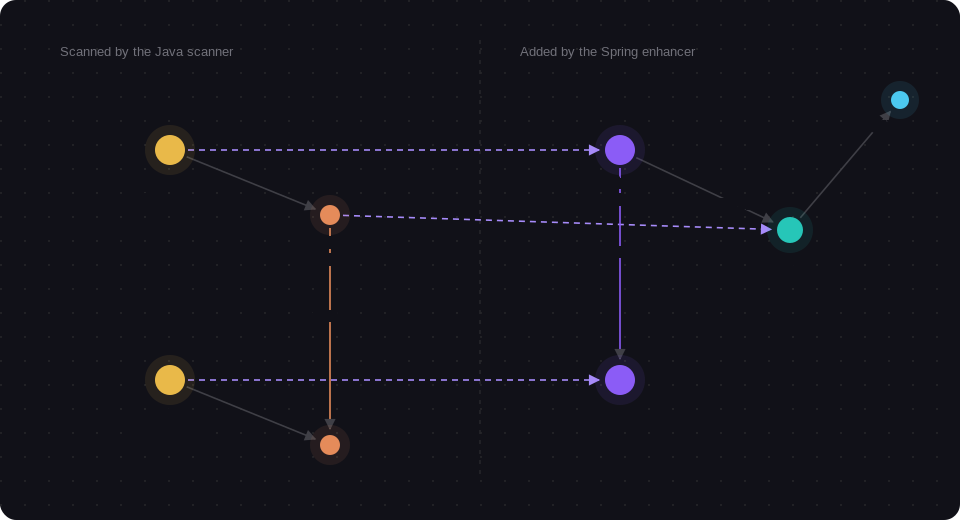
(OrderController:Class)-[:ENHANCE]->(:Controller {baseUrl: "/orders"})
(:Controller)-[:HAS_ENDPOINT]->(:Endpoint {httpMethod: "GET", url: "/orders/{id}"})
(findById:Method)-[:ENHANCE]->(:Endpoint)
(:Endpoint)-[:HAS_PATH_VARIABLE]->(:PathVariable {name: "id"})
(OrderService:Class)-[:ENHANCE]->(:Service)
(:Controller)-[:INJECTS]->(:Service)
Now you can ask Spring questions instead of Java ones. Every endpoint, with the services its controller uses:
MATCH (controller:Controller)-[:HAS_ENDPOINT]->(endpoint:Endpoint)
OPTIONAL MATCH (controller)-[:INJECTS]->(:Service)<-[:ENHANCE]-(service:Class)
RETURN endpoint.httpMethod, endpoint.url, collect(service.name) AS services
Combined with the CALLS relationships from the scanner, it also works the
other way around: from OrderService.findById, follow the calls back to
OrderController.findById and on to its endpoint, and you know a change to
the service affects GET /orders/{id}.
7. Into Neo4j
Finally, the results go into Neo4j, all below the scan's node:
(Scan)-[:HAS_TARGET]->(ScanTarget)-[:HAS_MODULE]->(Module)
(Module)-[:HAS_FILE]->(File)-[:DECLARES]->(Class)
(Module)-[:HAS_PACKAGE]->(Package)-[:CONTAINS]->(Class)
(Class)-[:HAS_METHOD]->(Method)
(Class)-[:HAS_FIELD]->(Field)
(Module)-[:DEPENDS_ON]->(Dependency)
(Method)-[:CALLS|INSTANTIATES|READS|WRITES|USES]->(...)
Every node carries the scan's id, including the ones enhancers add, so
deleting a scan deletes everything it stored. The exception is
Dependency: dependencies are shared between scans, so you can ask which
projects use a library. They're removed once no scan uses them.
The server also keeps the raw results, so the same scan can be enhanced again later without scanning the code again. Then it removes the scan's checkout from the volume, and the scan is complete.
What you can do with it
Because every scan is a graph, questions become queries. Which methods call
this one? Which modules depend on that library version? What does this pull
request affect? That last one is what the impact analysis answers, from the
CALLS and INSTANTIATES relationships the scanners recorded.
Graphnous is open source. You can run it yourself with Docker Compose from graphnous-oss, and watch the scan log go through each of these steps.